SAS® Model Manager
Create, manage and deploy lifecycle analytics
Benefits
- Reduces time to manage and deploy models into production.
- Provides an integrated environment for tracking and monitoring model performance.
- Enables compliance with regulatory requirements.
Features
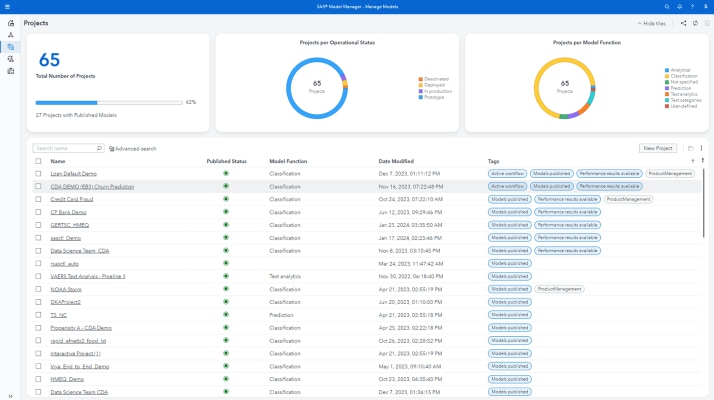
- Central, secure repository for organizing models
- Validate the scoring logic before exporting models to production
- Monitoring and reporting on model performance during test and production life cycles
- Overall lifecycle management of analytical models
How SAS® Is Different
- SAS Model Manager enables organizations to effectively create, manage and deploy statistical, predictive, classification and analytical scoring models in an enterprise computing environment.
- It provides a patented, secure, centralized repository for storing and organizing models backed by extensive documentation templates for each model.
- Accountability metrics and validation of analytical steps, from the time of creation through deployment into real-time or batch scoring systems, continues until the time a model must be retired.
Benefits
- Reduces time to manage and deploy models into production. SAS Model Manager provides an easy-to-use graphical user interface that guides users through a repeatable process for registering, testing and validating models. Accountability metrics and version control status reports track who changes what, when control is passed from one area to another, etc. Models can be monitored from their creation to deployment into real-time or batch scoring systems until they are retired.
- Provides an integrated environment for tracking and monitoring model performance. With its iterative framework, SAS Model Manager ensures analytical models are functionally performing as intended throughout the model life cycle. As models are tested and compared, performance benchmarking reports are generated. As they are deployed, performance metrics are pushed over established reporting channels. Modelers can easily collaborate and reuse models, and automated alerts can be set to detect when the scoring results are changing over time indicating model decay.
- Enables compliance with regulatory requirements. SAS Model Manager’s flexible and unique compliance and validation reporting are highly sought-after by those facing increasing regulatory requirements. Valuable best practices can be captured via the patented centralized data repository, lifecycle templates and metadata management system. Users are guided through the difficult steps of deploying analytics from creation into the production operational environment.
Features
- Central, secure repository for organizing models
-
-
Project-based storage of models.
-
Set up and maintain separate versions of champion and challenger models within a project:
-
Freeze a version.
-
Set a default version for the project.
-
Champion challenger model promotion.
-
-
Map prerequisite data sources used for model reporting and score code testing:
-
Training and test tables.
-
Score input and output tables.
-
Performance tables.
-
Project input and output tables.
-
-
Accounting and auditability:
-
Event logging of all major actions.
-
User-defined notes.
-
Attach documents (Microsoft Word documents, Microsoft Excel spreadsheets, HTML files, etc.) and add version control.
-
-
-
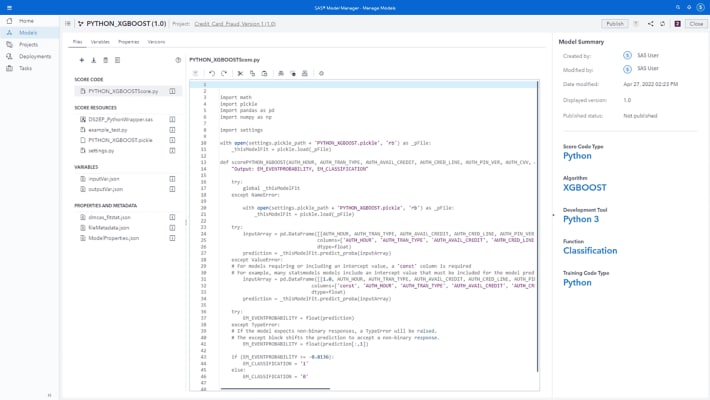
Prebuilt templates for registering standard data mining models:
-
Prediction.
-
Segmentation.
-
Classification.
-
Scorecards.
-
User-defined template.
-
GUI or SAS macro model registration.
-
Model Import Template editor.
-
Optional SAS macro model registration support.
-
-
Import multiple SAS Enterprise Miner models:
-
General properties such as model name, type of algorithm, creation date, modification date, etc.
-
Model inputs required for scoring.
-
Model outputs generated by scoring.
-
Score code including preliminary transformations.
-
Associated scoring tasks.
-
Advanced view of the SAS Enterprise Miner process flow diagram.
-
-
Import multiple SAS/STAT and Base SAS models:
-
Training code.
-
Score logic.
-
Estimate tables.
-
Target and input variable.
-
-
Import and export PMML model code with inputs and outputs.
-
Repository metadata summary report, such as:
-
Number of models; number of scoring jobs.
-
Model aging profiles.
-
Frequency counts of how often each target and input variable has been used across the model portfolio.
-
-
Query the model repository by attributes, such as:
-
Type of algorithm.
-
An input or target variable.
-
Model creator.
-
Model ID.
-
Lifecycle assignee or approval user.
-
Combination of query attributes.
-
Ability to add user-defined query keys.
-
-
Secure, reliable model storage and access administration:
-
Backup and restore capabilities.
-
Overwrite protection.
-
Event logging.
-
User authentication/access privilege administration.
-
-
- Validate the scoring logic before exporting models to production
-
-
Define test and production score jobs:
-
Map required inputs and outputs.
-
Add pre- and post-SAS code.
-
View log and results table.
-
Create interactive graphs.
-
-
Export models to SAS Metadata Repository.
-
Production scoring:
-
Mining Results Transformation available in SAS Data Integration Studio.
-
Model Scoring Task available in SAS® Enterprise Guide®.
-
Publish models directly to SAS Real-Time Decision Manager.
-
-
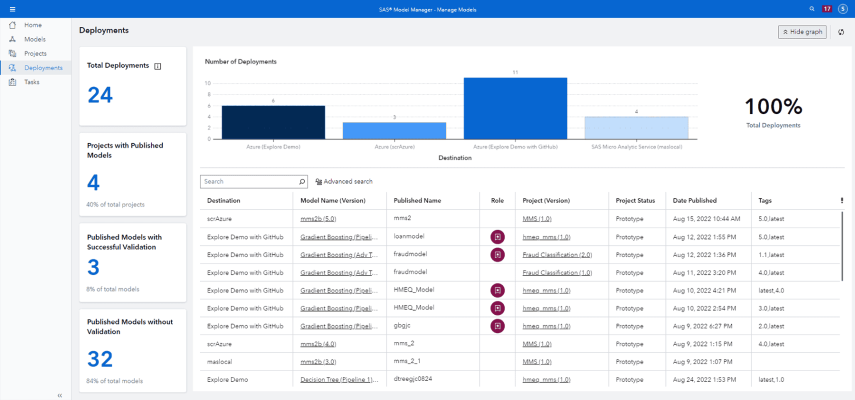
Publish model updates to different scoring channels:
-
E-mail notification sent to subscribers.
-
Store results to a file system or post to a corporate intranet.
-
-
In-database model deployment:
-
Integrated with the SAS Scoring Accelerator for Teradata to publish and validate Teradata Scoring functions for native scoring in Teradata Database.
-
-
- Monitoring and reporting on model performance during test and production life cycles
-
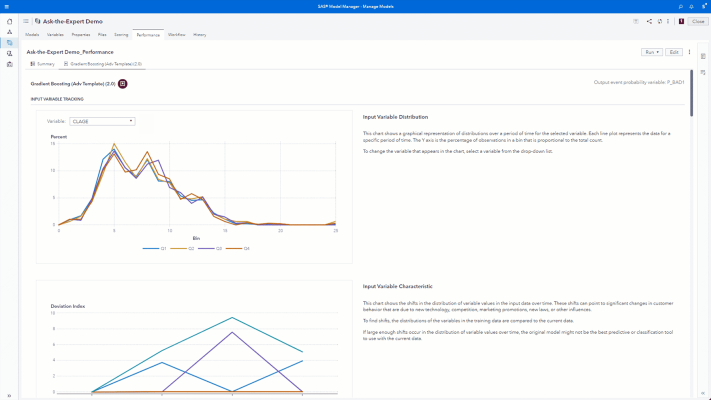
- Model Performance reports:
- Programs for summarizing scored data.
- Variable distribution plots.
- Characteristic chart.
- Stability chart.
- Lift chart.
- Receiver Operating Curve and Gini charts.
- Kolmogorov-Smirnov chart.
- Model Comparison reports:
- Model profile report.
- Delta report.
- Dynamic lift.
- Model monitoring report.
- Ad hoc SAS code report editor.
- HTML, RTF, PDF and Microsoft Excel output formats.
- GUI for creating performance monitoring reports.
- Model Performance reports:
- Overall lifecycle management of analytical models
-
-
Model lifecycle templates for collaborative project management:
-
Basic, Standard, Extended and User defined.
-
Model lifecycle template editor for User defined.
-
Task-oriented milestone completion and approval signoff.
-
-
Define start and completion dates.
- Progress completion status reports.
-
Screenshots
System Requirements
Client environment
-
Microsoft Windows (x86-32): Windows XP Professional, Windows Vista*, Windows Server 2003 family
-
Microsoft Windows on x64 (EM64T/AMD64): Windows XP Professional for x64, Windows Vista* for x64, Windows Server 2003 for x64
-
AIX: Version 5.3 and Version 6.1 on POWER architectures
-
HP-UX Itanium: HP-UX 11iv2 (11.23), 11iv3 (11.31)
-
Linux for x64 (EM64T/AMD64): RHEL 4 and 5, SuSE SLES 9 and 10
-
Solaris on SPARC: Version 9, 10
-
Microsoft Windows on x64 (EM64T/AMD64): Windows XP Professional for x64, Windows Vista* for x64, Windows Server 2003 for x64
* NOTE: Windows Vista Editions that are supported include Enterprise, Business and Ultimate
-
SAS Model Manager requires
Base SAS and SAS/STAT® software. -
SAS Enterprise Model Management is an inclusive sales bundle containing Base SAS, SAS/STAT and
SAS® Enterprise Miner™ software.
Ready to learn more?
Call us at 1-800-727-0025 (US and Canada) or request more information.