SAS® Office Analytics
Seamless access to the power of SAS® Analytics in familiar Microsoft Office environments
It revolutionizes the world of business intelligence by enabling business users to fully engage the power of SAS for data access, reporting and analytics directly from Microsoft Office via integrated menus and toolbars.
Benefits
- Makes consistent data from multiple sources easily available.
- Provides business users with self-sufficient access to powerful SAS Analytics from within Microsoft Office.
- Surfaces results directly in Outlook.
- Encourages collaborative decision support.
- Helps satisfy corporate and governmental compliance regulations.
Features
- Data access and management
- Powerful SAS® Analytics
- Graphics and reporting
- Guided analysis and model development for power users
- Business metadata management for IT
Screenshot
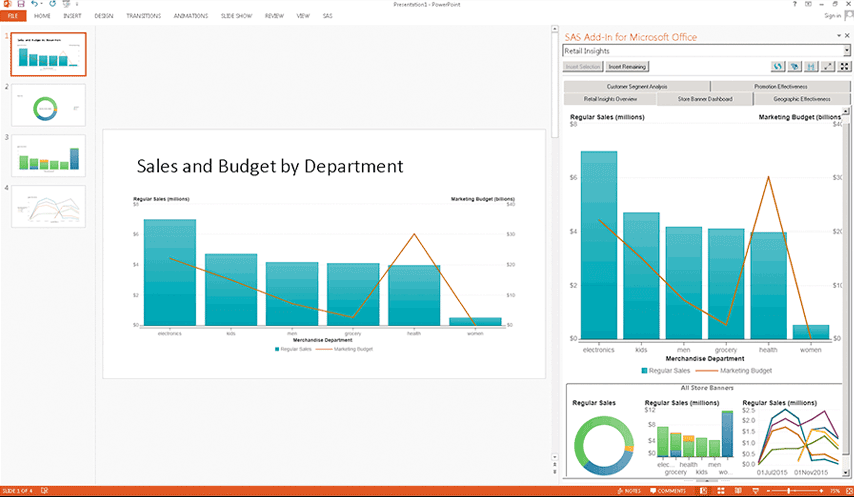
Seamless integration with Microsoft Office gives you easy access to SAS tasks, charts and statistics.
Screenshots
How SAS® Is Different
- SAS Office Analytics provides real-time access to data, enabling users to refresh data automatically, run queries and apply relevant filters to ensure that the most up-to-date information is readily available.
- SAS Office Analytics enables users to access the market-leading statistical power of SAS. Advanced analytics are available to business users via SAS® Enterprise Guide® and SAS/STAT® software, both included in this offering.
- Business analysts and users do not need to leave the comfort of Microsoft Office (Word, Excel or PowerPoint) to produce analytic reports or manipulate results.
- Minimal training is required to form fact-based decisions that lead to a competitive advantage. SAS Office Analytics helps users create data access paths and statistical routines that lead to greater analytical insights.
- Users can publish reports and/or share the Microsoft Office files with executive management and information consumers through various Microsoft Office applications.
Benefits
- Makes consistent data from multiple sources easily available. Instead of everyone building their own extracts of data and merging and managing that data in Microsoft Excel, users can take the most recent data from operational systems and populate Excel, Word, or PowerPoint files or SharePoint portals. No longer will users have different versions of the same report.
- Provides business users with self-sufficient access to powerful SAS Analytics from within Microsoft Office. SAS Office Analytics enables Excel users to access and view data sources and analyze the data with high-end analytics from SAS, meaning they get more than just summaries and basic graphs. An intuitive query interface returns analytic results directly into Excel spreadsheets, enabling users to preview and query large amounts of data. Business users can be assured they have the up-to-date data needed for accurate analysis and remove the problems associated with intermediate summarized data formats.
- Surfaces results directly in Outlook. View SAS graphical reports directly in the Outlook mail client via the SAS gadget pane. Users can browse existing SAS assets, and, based on their data permissions, update reports when more current data is available.
- Encourages collaborative decision support. Business users can comment on reports and others can reply to those comments in Outlook from the SAS Gadget Pane. When Microsoft Communicator is used, presence indicators facilitate instant message conversations about shared views of data and reports.
- Helps satisfy corporate and governmental compliance regulations. With SAS, you can produce repeatable results using validated data and processes that are easily documented and verified for corporate and governmental compliance. Think how much time can be saved – no more tracking down which report is correct.
Features
- Data access and management
-
- Access SAS capabilities for data access, reporting and analytics directly from Microsoft Office tools, including Word, Excel and PowerPoint from the Microsoft Outlook mail client and from the Microsoft SharePoint portal.
- Access data from any centrally IT-defined enterprise data source.
- Easy data access and integration without detailed knowledge of the database or SQL.
- Refresh data at the click of a button from any central enterprise data source defined by IT.
- Cycle through data that exceeds row limitations of Microsoft Excel. (Server-side optimization ensures that large data sources are never transferred as one to the client.)
- Includes SAS/ACCESS® Interface to PC Files for access to Microsoft Excel, Microsoft Access, dBase, Lotus, SPSS, JMP® and Stata.
- Includes SAS/ACCESS Interface to ODBC for access to any ODBC-compliant data source.
- With the included SAS Stored Process Server, users can automate programs to run reports as scheduled or to facilitate users' on-demand updates of reports from within Outlook, SharePoint or links within Office files.
- Powerful SAS® Analytics
-
A wide range of powerful statistical analysis capabilities, including:
- Analysis of variance for analyzing experimental data.
- Regression to examine the relationship between a response variable and a set of explanatory variables.
- Categorical data analysis for investigating the association of data categories and the strength of the relationships.
- Multivariate analysis for modeling data with two or more response variables or for identifying relationships among variables.
- Survival analysis for measuring lifetime or time until an event.
- Cluster analysis, which places observations into groups based on similarity.
- Multiple imputation that lets you fill in missing values to generate complete data sets.
- Graphics and reporting
-
- Wizard-driven report creation from within Microsoft Office tools.
- Render reports created with SAS inside of Microsoft Office applications.
- Refresh tables and charts automatically to get the latest view of information.
- Manipulate pivot tables to illustrate multidimensional data from various sources.
- Deliver graphics into Microsoft Outlook, Word, Excel or PowerPoint as ActiveX, GIF, JPEG or PNG formats.
- Enable distribution of embedded results on demand using native Microsoft Office functionality.
- Provide the ability to add SAS Stored Processes to a SharePoint page.
- Guided analysis and model development for power users
-
- A native Windows application for programmers, analysts or advanced users.
- User interface includes context-sensitive menus, toolbars and role-based user definitions.
- Provides a large number of prebuilt tasks and task templates covering a wide variety of topics.
- Wizard-driven conditional flow logic capabilities for more rapid creation of complex conditional processing.
- Enhanced complex query with computed columns creation, filtering options and preview of results brings efficiency to the query-building process.
- View OLAP cubes from SAS or other vendors that support OLE DB for OLAP and the MDX standard.
- Package results into SAS Stored Processes that can be used in all SAS Business Intelligence interfaces and Microsoft Office to gain access to anything SAS can do, allowing work to be distributed without IT involvement while maintaining security.
- Business metadata management for IT
-
- Map physical data structures to business terms in an easy-to-use interface.
- Combine data from multiple sources.
- Control the size of result sets that can be returned to avoid long-running queries.
- Centrally manage metadata.
- Create and manage prompts, including cascading prompts, that dynamically generate value lists and repositories, control the SAS Metadata Server, define access controls and register and manage users and groups through a single interface.
System Requirements
Client environment
- Microsoft Windows (32-bit): Windows XP Professional, Windows Vista*, Windows 7
- Microsoft Windows x64 (64-bit): Windows XP Professional for x64, Windows Vista* for x64, Windows 7 for x64
Supported Web browsers
- Internet Explorer 7 and 8 on Windows XP Pro, Microsoft Server 2003 and 2008, and Windows Vista*
- Internet Explorer 8 on Windows Server 2008 and Windows 7
- Internet Explorer 9 on Windows Vista and Windows 7
- Firefox 3.6 on Windows XP Pro, Microsoft Server 2008, Windows Vista* and Linux for x86 (SuSE and RHEL)
Web server environment
- IBM WebSphere 7.0.0.13 on: AIX, Linux x64, Solaris (SPARC and x64), Windows x64, z/OS
- JBoss EAP 4.3 on: AIX on Power, HP/UX on Itanium, Linux x64, Solaris (SPARC and x64), Windows x64
- Oracle WebLogic 10gr3 and 11gr1 on: AIX on Power, HP/UX on Itanium, Linux x64, Solaris (SPARC an x64), Windows x64
Server environment
- HP/UX on Itanium: 11iv3 (11.31)
- HP/UX on PA-RISC: 11iv3 (11.31)
- IBM AIX on POWER architectures: 6.1 and 7.1
- IBM z/OS: V1R10 and higher
- Linux (32-bit): Novell SuSE 10 and 11; RHEL 5 and 6
- Linux x64 (64-bit): Novell SuSE 10 and 11; RHEL 5 and 6; Oracle Linux 5.5 and 6
- Microsoft Windows (32-bit): Windows XP Professional, Windows Vista*, Windows 7, Windows Server 2003 family, Windows Server 2008 family
- Microsoft Windows on x64 (64-bit): Windows XP Professional for x64, Windows Vista* for x64, Windows 7 for x64, Windows Server 2003 family for x64, Windows Server 2008 family for x64
- Solaris on SPARC: Version 10 Update 8
- Solaris on x64 (x64-86): Version 10 Update 8
* Windows Vista Editions that are supported include Enterprise, Business and Ultimate.
Ready to learn more?
Call us at 1-800-727-0025 (US and Canada) or request more information.

