
Explore and Model – Quick Look
SAS Viya accelerates AI and analytics development with built-in governance, explainability and optimization tools. Intelligent automation recommends optimal models, streamlines data preparation and ensures transparency across every step of the workflow – delivering faster, more accurate and trusted AI outcomes ready for enterprise-scale production.
Now available: SAS Viya Copilot assistance will take productivity even further by simplifying pipeline creation and boosting productivity.
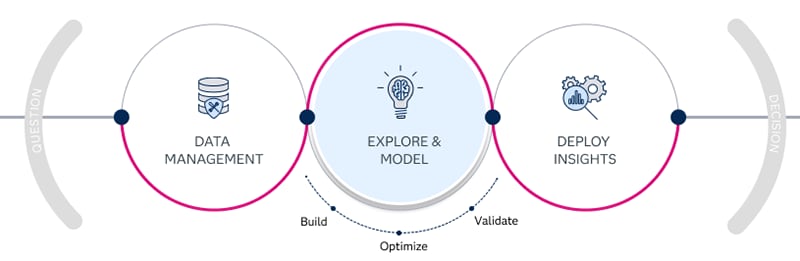
Build
Build models with multiple AI techniques to solve real-world problems.
Optimize
Refine and compare models to select the best-performing approach.
Validate
Ensure outputs meet business goals and governance requirements.
SAS Viya’s built-in visualization tools reduced time spent on data exploration by 69x, freeing up data scientists to focus on core data modeling tasks and quickly achieving new insights.” – The Futurum Group
Discover and Visualize
SAS Visual Analytics makes it easy to explore data, uncover hidden patterns and create stunning reports. Use machine learning and natural language explanations to visualize, narrate and share explainable insights that go beyond basic business intelligence.

Discover
Quickly spot important relationships in your data using suggestions and clearly identified related measures. Use machine learning and natural language explanations to find, visualize and narrate stories and insights that are easy to understand and explain.

Explore
Automatically build interactive analytical stories with your data – in seconds. Automated Explanation determines which variables contribute to an outcome and provides a simple, natural language explanation.

Visualize
Create interactive reports and dashboards. Summarize key metrics and share via web and mobile. Executives and staff can collaborate on insights, slice and dice to find their own answers, and better understand business performance.

Collaborate
Rapidly share reports and dashboards directly with colleagues or teams. Set permissions to control who can view or edit. SAS Visual Analytics integrates seamlessly with Microsoft 365 tools, allowing users to embed reports into PowerPoint presentations or Excel files.

Integrate
Add interactive visualizations with third-party JavaScript libraries like D3 and C3 within SAS Visual Analytics. Leverage the SAS Viya SDK and REST APIs to access SAS analytics, data and services from any client language.
Build Models
In SAS Model Studio, building, comparing and refining models is faster and more efficient than ever. Use guided tasks, low-code pipelines or your preferred programming language to prepare data, test ideas and create models. Transparent AutoML and AI tools help you explore options, select the best model and deploy with confidence.

Low/no code
Quickly build out data science workflows with a few clicks, enabling rapid iteration and experimentation with advanced techniques, including deep learning, time series forecasting and reinforcement learning.

AutoML
Accelerate model development and optimize for performance with powerful AutoML capabilities spanning the analytics life cycle. Leverage automated data processing, feature engineering, model tuning and champion model selection.

SAS + open source
Facilitate collaboration and empower users to call open source algorithms within a model pipeline. Experiment with SAS, Python, R and Lua models to find the best-performing option.

Model trust
Get automated insights and summaries from embedded natural language generation and assess models for performance and bias. Get instant access to interpretability reports in all modeling nodes, including LIME, ICE, Kernel SHAP and PD heatmaps.

Viya Copilot
Now available: Empower any level of user to leverage trusted and secure AI assistants for data and AI tasks with SAS Viya Copilot.
Composite AI
The composite AI of SAS Viya brings together machine learning, forecasting, optimization, GenAI and more to deliver faster, more explainable insights. Build scalable models using the right technique for the task – with automation, transparency and support for open source integration.

Machine learning
Solve complex analytical problems with machine learning and deep learning. SAS visual machine Learning facilitates the entire data mining and machine learning process, allowing users of all skill levels to manage analytics tasks efficiently and automatically.

Text analytics
Efficiently analyze and categorize large volumes of textual data. SAS Visual Text Analytics leverages natural language processing, machine learning and linguistic rules to transform unstructured data into meaningful insights.

Forecasting
Quickly and reliably predict outcomes and plan better for the future. SAS Visual Forecasting supports all stages of forecasting and automates large-scale time series analyses and hierarchical forecasts.

Optimization
Deliver the best results given resource constraints. With SAS Optimization, you can consider more alternative actions and scenarios, and determine the best allocation of resources and plans for accomplishing goals.

Statistics
SAS Visual Statistics provides you with interactive data exploration and predictive modeling capabilities. Intuitive visual interfaces allow users to uncover insights, identify trends and build predictive models.

Econometrics
Explore and explain economic relationships between variables with SAS Econometrics. Test economic theories, make informed policy decisions and forecast future economic trends by bridging the gap between theoretical economics and practical applications.

Generative AI
Achieve real value with generative AI using SAS Viya to integrate LLMs into your business and industry processes and govern their life cycles.
SAS Viya Workbench
Designed to complement the SAS Viya platform, SAS Viya Workbench is a standalone, cloud-based coding environment for fast, flexible model development. Use JupyterLab, Visual Studio Code or SAS® Enterprise Guide® to write and run SAS, Python or R – independent of the full Viya platform.

On demand
Quickly provision and terminate workbench sessions, minimizing cloud computing costs and ensuring you only use the resources needed for your project.

Multiple IDEs
SAS Viya Workbench supports popular IDEs like Visual Studio Code, JupyterLab/Jupyter Notebook and SAS Enterprise Guide, allowing you to work in your preferred coding environment.

SAS, Python or R
Code in the language of your choice. SAS Viya Workbench supports SAS, Python and R code.

Scalable
Customize your compute power by adjusting CPU, memory and GPU resources to match the needs of your projects.

GitHub integration
Connect your environment with GitHub for efficient collaboration, version control and code management among distributed teams.